Python:
Automating Access Control List Updates with Python
In this project I created an algorithm that updates the list in an allowed access file and removes all IP addresses that should no longer have access. The "allow_list.txt" file identifies these IP addresses. A separate remove list identifies IP addresses that should no longer have access to this content. I created an algorithm to automate updating the "allow_list.txt" file and remove these IP addresses that should no longer have access.
Open the file
For the first part of the algorithm, I opened the "allow_list.txt" file.
First, I assigned this file name as a string to the import_file variable
Then, I used a with to open the file:
In this algorithm, I used a with statement and the .open() function in read mode ("r") to access the allow list file and read the IP addresses stored inside it. Using with helps manage the file automatically, so I don't have to worry about closing it manually when I'm done.
In the line with open(import_file, "r") as file:, the open() function takes two arguments. The first specifies which file I want to open, and the second ("r") tells Python that I want to read the file. I then use the as keyword to assign the opened file to the variable file, which allows me to work with the file's contents inside the with statement.


Reading the file contents
In order to read the file contents, I used the .read() method to convert it into the string.
When I open a file in read mode using .open("r"), I can use the .read() method inside the with statement to read everything in the file. The .read() method returns the file contents as a string, which I then store in the variable ip_addresses.
In simple terms, this code opens the allow_list.txt file, reads all of its contents, and saves them as a string. Storing the data in a variable makes it easier for me to organize, analyze, and work with the information later in the program.

Convert the string into a list
To remove individual IP addresses from the allow list, I first needed to convert the data from a string into a list. I used the .split() method to do this. The .split() method takes the contents stored in ip_addresses and separates them into individual items based on spaces, creating a list. Once the data was in list format, I could access, modify, and remove specific IP addresses as needed.

I used the .split() method to convert the contents of ip_addresses from a string into a list. This was necessary because working with individual IP addresses is much easier when they are stored as separate list elements rather than one long string.
The .split() method is called on a string and, by default, separates the text wherever there is whitespace. Since the IP addresses in the allow list were separated by spaces, .split() automatically created a list containing each IP address as its own element. I then reassigned the result back to the ip_addresses variable so I could easily search for, access, and remove specific IP addresses later in the program.
Iterate through the remove list
An important part of this algorithm is looping through each IP address in the remove_list. I used a for loop to iterate through the list one item at a time, allowing the program to check each IP address and remove it from the allow list if it was present.
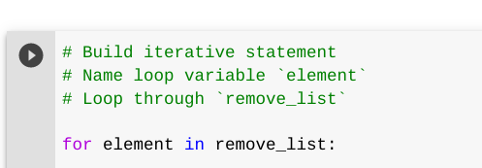
I used a for loop to go through each IP address in the ip_addresses list one at a time. The for keyword starts the loop, and element acts as a temporary variable that stores the current IP address being processed. The in keyword tells Python to iterate through the ip_addresses list, assigning each IP address to element as the loop runs. This allows the same code to be applied to every IP address in the list.
Remove IP addresses that are on the remove list
Because there were no duplicate IP addresses in ip_addresses, I was able to use the .remove() method to delete any IP address that also appeared in remove_list. As the loop moved through each item in remove_list, the .remove() method searched for that IP address in ip_addresses and removed it if it was found. This allowed me to update the allow list by removing all unwanted IP addresses:
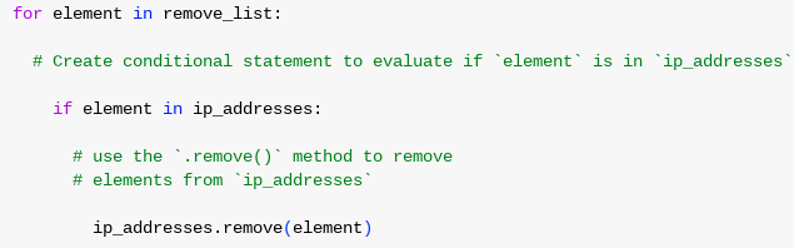
First, I added a conditional statement inside the for loop to check whether the current IP address (element) existed in the ip_addresses list. I included this check because trying to remove an IP address that isn't in the list would cause an error.
If the IP address was found, I used the .remove() method to delete it from ip_addresses. By passing element as the argument, the loop removed each IP address from the allow list that also appeared in the remove_list.
Update the file with the revised list of IP addresses
Lastly, I needed to update the allow list file with the revised list of IP addresses. Since the file contents were originally stored as a string, I first had to convert the list back into string format. To do this, I used the .join() method, which combines the elements of a list into a single string. This allowed me to prepare the updated IP addresses so they could be written back to the allow list file.

I used the .join() method to convert the ip_addresses list back into a string so it could be written to the file. The .join() method combines all the elements in a list into a single string using a specified separator. In this case, I used "\n" as the separator so that each IP address would appear on its own line. Once the list was converted back to a string, I could pass it to the .write() method to update the allow_list.txt file.
Then, I used another with statement to reopen the file, this time in write mode, and used the .write() method to save the updated list of IP addresses. Using a with statement ensured the file would be properly closed when the update was complete, while the .write() method replaced the old contents of the file with the revised allow list.
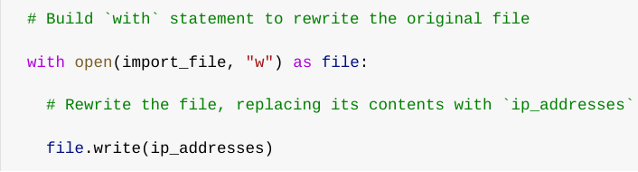
This time, I opened the file using the "w" argument, which puts the file in write mode. Write mode allows me to replace the existing contents of the file with new data. Inside the with statement, I used the .write() method to update the allow_list.txt file with the revised list of IP addresses. I passed the ip_addresses variable to .write(), which overwrote the old contents of the file with the updated allow list. As a result, any IP addresses that had been removed from the list would no longer have access.
Summary
In this algorithm, I removed IP addresses listed in remove_list from the approved IP addresses stored in allow_list.txt. I started by opening the file and reading its contents into a string, then converted that string into a list so I could work with each IP address individually. Next, I looped through each IP address in remove_list and checked whether it existed in the allow list. If it did, I removed it from the list. Once all unwanted IP addresses were removed, I used the .join() method to convert the list back into a string and wrote the updated contents back to allow_list.txt. The result was an updated allow list that no longer included the removed IP addresses.