SQL :
SQL Filters for Cybersecurity Monitoring and System Updates
In this project, my role is to help keep the organization's systems secure by investigating potential security issues and ensuring employee devices are updated when needed. To complete these tasks efficiently, I used SQL queries with filters to locate and analyze specific information within the company's data.
Retrieve after hours failed login attempts
There was a potential security incident that occurred after business hours, so all failed login attempts made after 18:00 needed to be investigated. To identify the relevant records, I created a SQL query that filtered the login activity data for failed login attempts that occurred outside normal business hours. This allowed me to focus my investigation on the events that were most likely related to the security concern.
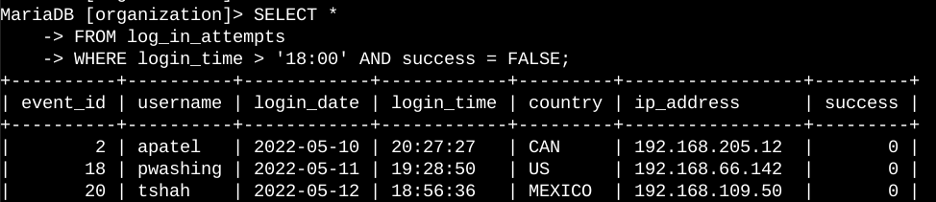
The first part of the screenshot shows the SQL query I created, and the second part shows a portion of the results it returned. This query was designed to identify failed login attempts that occurred after business hours. I started by selecting all records from the log_in_attempts table. Then, I used a WHERE clause with an AND operator to narrow the results to only the records that met both conditions. The first condition, login_time > '18:00', filtered for login attempts that occurred after 6:00 PM. The second condition, success = FALSE, filtered for login attempts that were unsuccessful. By combining these conditions, the query returned only the failed login attempts that occurred after business hours, allowing me to focus my investigation on those specific events.
Retrieve login attempts on specific dates
A suspicious event occurred on 2022-05-09, so all login activity from that date and the day before needed to be reviewed. To identify the relevant records, I created a SQL query that filtered the login data for login attempts that occurred on either 2022-05-09 or 2022-05-08. This allowed me to focus my investigation on the activity that took place during the time period associated with the suspicious event.
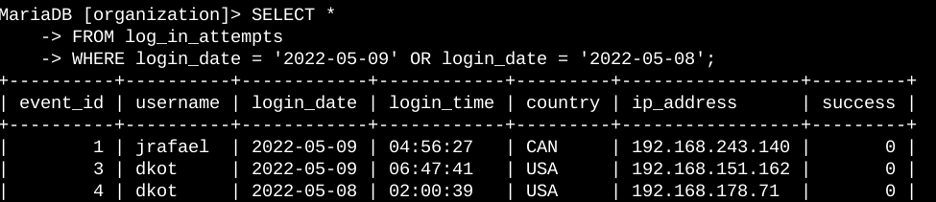
The first part of the screenshot shows the SQL query I created, and the second part shows a portion of the results it returned. This query was designed to identify all login attempts that occurred on either 2022-05-09 or 2022-05-08. I started by selecting all records from the log_in_attempts table. Then, I used a WHERE clause with an OR operator to filter the results so that only login attempts from those two dates were returned. The first condition, login_date = '2022-05-09', filters for login attempts that occurred on May 9, 2022. The second condition, login_date = '2022-05-08', filters for login attempts that occurred on May 8, 2022. Because the conditions are joined with an OR operator, any record that matches either date is included in the results
Retrieve login attempts outside of Mexico
After reviewing the login attempt data, I found potentially suspicious activity originating from locations outside of Mexico. Because these login attempts may indicate unauthorized access, they needed to be investigated further. To identify the relevant records, I created a SQL query that filtered the login data and returned only the login attempts that occurred outside of Mexico. This allowed me to focus my investigation on activity that originated from unexpected locations.
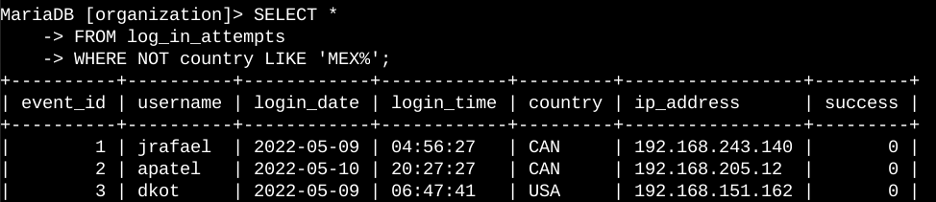
The first part of the screenshot shows the SQL query I created, and the second part shows a portion of the results it returned. This query was designed to identify login attempts that occurred outside of Mexico. I started by selecting all records from the log_in_attempts table. Then, I used a WHERE clause with the NOT operator to exclude login attempts that originated from Mexico. To account for the different ways Mexico was represented in the dataset, I used the LIKE operator with the pattern MEX%. The % wildcard allows for any number of characters after "MEX", so it matches values such as MEX and MEXICO. By combining NOT with LIKE, the query returned only the login attempts from countries other than Mexico, allowing me to focus on potentially suspicious activity from outside the expected location.
Retrieve employees in Marketing
Me needed to identify which computers in the Marketing department required updates. To do that, I had to find the devices assigned to Marketing employees who worked in the East building. The following SQL query shows how I filtered the employee data to return only the machines that matched those criteria.
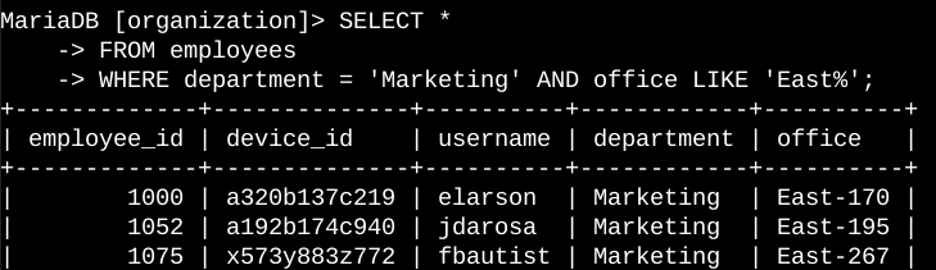
The first part of the screenshot shows the SQL query I created, and the second part shows a portion of the results it returned. This query was designed to identify employees in the Marketing department who work in the East building. I started by selecting all records from the employees table. Then, I used a WHERE clause with an AND operator to return only employees who met both conditions. The first condition, department = 'Marketing', filters for employees in the Marketing department. The second condition, office LIKE 'East%', filters for employees whose office location is in the East building. I used LIKE with the pattern East% because the office column includes specific office numbers after the building name. The % wildcard matches any additional characters, allowing the query to return all Marketing employees located anywhere in the East building.
Retrieve employees in Finance or Sales
The machines assigned to employees in the Finance and Sales departments also required a security update. Since this update only applied to those two departments, I needed to identify the employees who worked in either Finance or Sales. The following SQL query shows how I filtered the employee data to return only records from those departments.
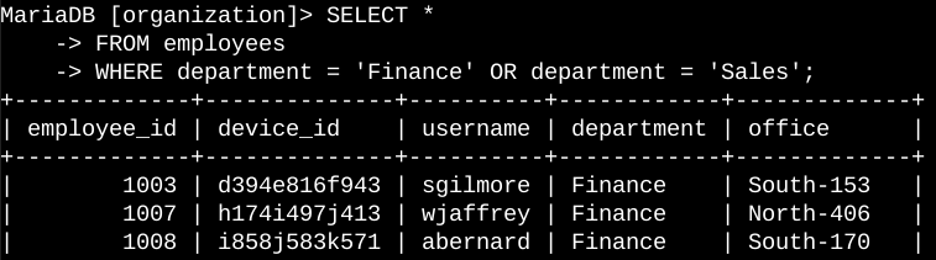
The first part of the screenshot shows the SQL query I created, and the second part shows a portion of the results it returned. This query was designed to identify employees in either the Finance or Sales departments. I started by selecting all records from the employees table. Then, I used a WHERE clause with an OR operator to return employees who met either condition. The first condition, department = 'Finance', filters for employees in the Finance department. The second condition, department = 'Sales', filters for employees in the Sales department. I used the OR operator because I wanted results from either department rather than only employees who met both conditions. As a result, the query returned all employees who work in Finance or Sales, allowing my team to identify the machines that needed the security update.
Retrieve all employees not in IT
We needed to apply an additional security update to employees who were not part of the Information Technology department. Before the update could be completed, I needed to identify which employee machines were assigned to individuals outside of IT. The following SQL query shows how I filtered the employee data to return only employees who were not in the Information Technology department.
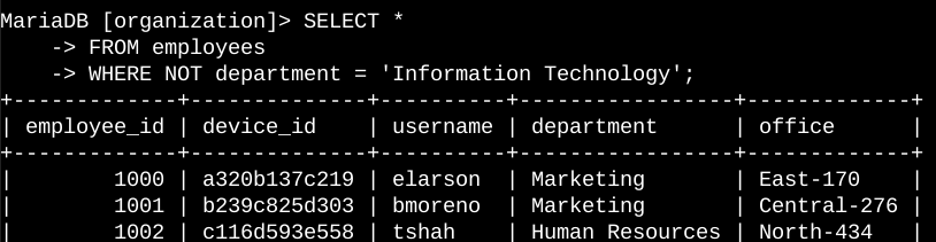
The first part of the screenshot shows the SQL query I created, and the second part shows a portion of the results it returned. This query was designed to identify employees who are not part of the Information Technology department. I started by selecting all records from the employees table. Then, I used a WHERE clause with the NOT operator to exclude employees whose department was Information Technology. By using NOT, the query returned all employees outside of the IT department, allowing me to identify the machines that required the security update.
Summary
In this project, I used SQL filters to retrieve specific information related to security investigations and system updates. I worked with two tables, log_in_attempts and employees, and created queries to identify suspicious login activity, investigate potential security incidents, and determine which employee machines required updates. To narrow my results, I used the AND, OR, and NOT operators to apply different conditions to each query. I also used the LIKE operator along with the % wildcard to search for patterns within the data. These filtering techniques allowed me to efficiently locate the records needed to support security and system administration tasks.